justify-items property
The justify-items property specifies
an alignment of elements inside grid cells
along the inline axis. The alignment can be
seen most clearly when viewing the grid in
the browser debugger. Applies to
parent element.
Syntax
selector {
	justify-items: flex-start | flex-end | center ;
}
Values
| Value | Description |
|---|---|
flex-start |
Elements are pressed to the start of the inline axis. |
flex-end |
Elements are pressed to the end of the inline axis. |
center |
Blocks are centered on the inline axis. |
Example . Alignment to the start of the inline axis
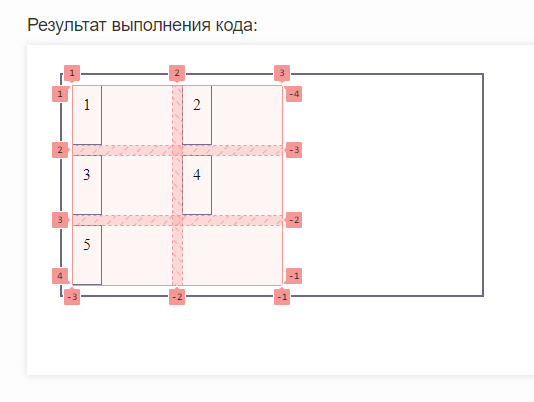
Let's align our elements inside the cells to the start of the inline axis:
<div id="parent">
	<div>1</div>
	<div>2</div>
	<div>3</div>
	<div>4</div>
	<div>5</div>
</div>
#parent {
	display: grid;
	justify-items: start;
	grid-template-columns: 100px 100px;
	grid-template-rows: repeat(3, 1fr);
	gap: 10px;
	padding: 10px;
	height: 200px;
	width: 400px;
	border: 2px solid #696989;
}
#parent > div {
	gap: 10px;
	padding: 10px;
	box-sizing: border-box;
	border: 1px solid #696989;
}
:
Now let's look at our grid in the debugger:
Example . Alignment to the center of the inline axis
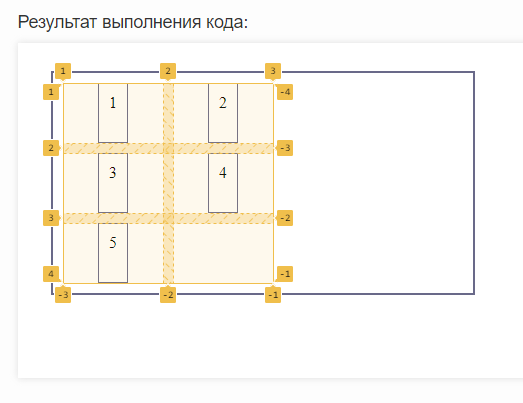
Let's align our elements inside the cells to the center of the inline axis:
<div id="parent">
	<div>1</div>
	<div>2</div>
	<div>3</div>
	<div>4</div>
	<div>5</div>
</div>
#parent {
	display: grid;
	justify-items: center;
	grid-template-columns: 100px 100px;
	grid-template-rows: repeat(3, 1fr);
	gap: 10px;
	padding: 10px;
	border: 2px solid #696989;
	height: 200px;
	width: 400px;
}
#parent > div {
	gap: 10px;
	padding: 10px;
	box-sizing: border-box;
	border: 1px solid #696989;
}
:
By opening the browser debugger we will see our grid:
Example . Alignment to the end of the inline axis
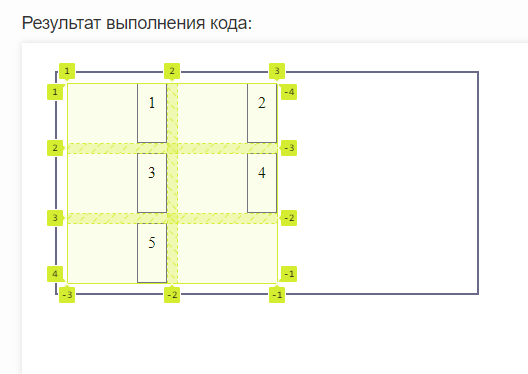
Let's align our elements to the end of the inline axis:
<div id="parent">
	<div>1</div>
	<div>2</div>
	<div>3</div>
	<div>4</div>
	<div>5</div>
</div>
#parent {
	display: grid;
	justify-items: end;
	grid-template-columns: 100px 100px;
	grid-template-rows: repeat(3, 1fr);
	gap: 10px;
	padding: 10px;
	border: 2px solid #696989;
	height: 200px;
	width: 400px;
}
#parent > div {
	gap: 10px;
	padding: 10px;
	box-sizing: border-box;
	border: 1px solid #696989;
}
:
Now let's look at the grid via the debugger:
See also
-
the
align-itemsproperty
that specifies an alignment along the cross axis -
the
place-itemsproperty
that sets an alignment of elements within grid cells